OpenClaw安装部署教程
CentOS宝塔面板 部署 OpenClaw
Windows系统安装部署OpenClaw中文版
初始化配置向导
Windows系统模型配置文件
查看网关令牌 token和设备授权
配置文件增加数字先锋API模型
systemd常驻启动服务
如何查看使用增加的模型
接入飞书机器人
飞书手机端如何提交指令让它在服务器上工作
windows用nvm-升级Node 版本
OpenClaw 启动慢?7 个真实原因与对应解决方案
例:Agent 系统提示词(运维自动巡检)
例:OpenClaw 写代码改造提示词 + 执行清单
首页
#### 配置文件默认位置 ```bash #服务器配置文件位置 /root/.openclaw/openclaw.json #WIN系统配置文件位置 ~\.openclaw\openclaw.json C:\Users\Administrator\.openclaw\openclaw.json ``` ```bash #统一接口网址 https://api.cxsee.com/v1 ``` 这里分两段增加,如果需要增加其他模型参照同样方法,比如增加claude-sonnet-4-6模型 gemini-3.1-pro-preview模型 MiniMax-M2.7模型 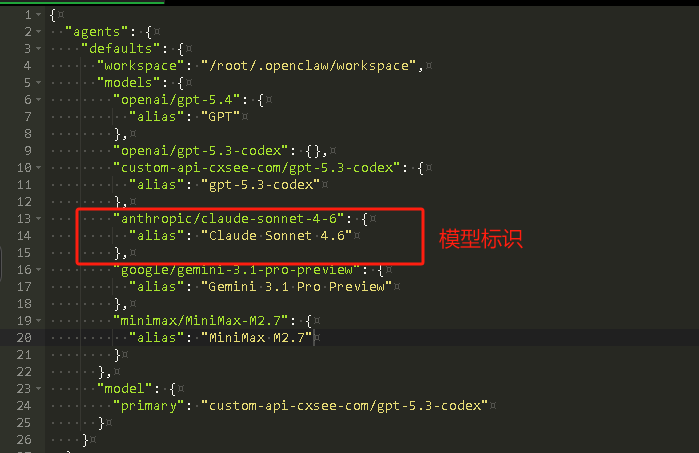 默认gpt-5.3-codex下方模型名称及接口对应增加 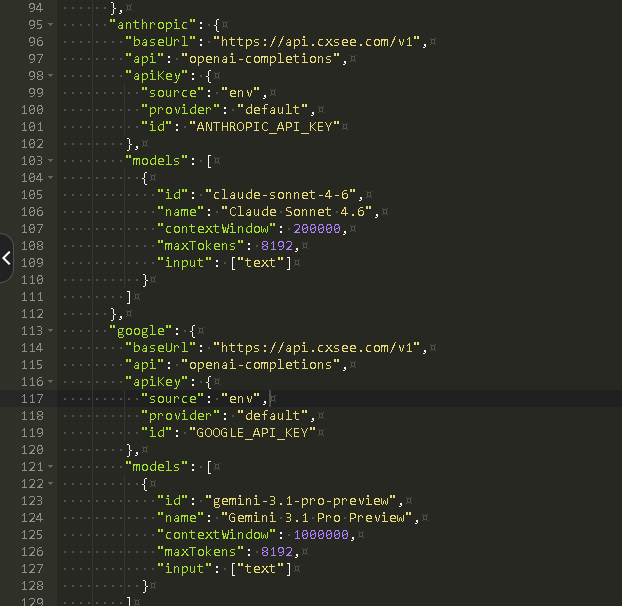 配置文件参考,注意更换自己的域名和你的token ```bash #配置文件参考 { "agents": { "defaults": { "workspace": "/root/.openclaw/workspace", "models": { "openai/gpt-5.4": { "alias": "GPT" }, "openai/gpt-5.3-codex": {}, "custom-api-cxsee-com/gpt-5.3-codex": { "alias": "gpt-5.3-codex" }, "anthropic/claude-sonnet-4-6": { "alias": "Claude Sonnet 4.6" }, "google/gemini-3.1-pro-preview": { "alias": "Gemini 3.1 Pro Preview" }, "minimax/MiniMax-M2.7": { "alias": "MiniMax M2.7" } }, "model": { "primary": "custom-api-cxsee-com/gpt-5.3-codex" } } }, "gateway": { "mode": "local", "auth": { "mode": "token", "token": "你的token" }, "port": 18789, "bind": "loopback", "trustedProxies": ["127.0.0.1", "::1"], "tailscale": { "mode": "off", "resetOnExit": false }, "controlUi": { "allowInsecureAuth": false, "allowedOrigins": [ "https://你的网址.com" ] } }, "session": { "dmScope": "per-channel-peer" }, "tools": { "profile": "coding" }, "auth": { "profiles": { "openai:default": { "provider": "openai", "mode": "api_key" } } }, "wizard": { "lastRunAt": "2026-04-03T10:31:07.258Z", "lastRunVersion": "2026.4.2", "lastRunCommand": "configure", "lastRunMode": "local" }, "meta": { "lastTouchedVersion": "2026.4.2", "lastTouchedAt": "2026-04-03T10:31:07.271Z" }, "models": { "mode": "merge", "providers": { "custom-api-cxsee-com": { "baseUrl": "https://api.cxsee.com/v1", "api": "openai-completions", "apiKey": { "source": "env", "provider": "default", "id": "CXSEE_API_KEY" }, "models": [ { "id": "gpt-5.3-codex", "name": "gpt-5.3-codex (Custom Provider)", "contextWindow": 16000, "maxTokens": 4096, "input": ["text"], "cost": { "input": 0, "output": 0, "cacheRead": 0, "cacheWrite": 0 }, "reasoning": false } ] }, "anthropic": { "baseUrl": "https://api.cxsee.com/v1", "api": "openai-completions", "apiKey": { "source": "env", "provider": "default", "id": "ANTHROPIC_API_KEY" }, "models": [ { "id": "claude-sonnet-4-6", "name": "Claude Sonnet 4.6", "contextWindow": 200000, "maxTokens": 8192, "input": ["text"] } ] }, "google": { "baseUrl": "https://api.cxsee.com/v1", "api": "openai-completions", "apiKey": { "source": "env", "provider": "default", "id": "GOOGLE_API_KEY" }, "models": [ { "id": "gemini-3.1-pro-preview", "name": "Gemini 3.1 Pro Preview", "contextWindow": 1000000, "maxTokens": 8192, "input": ["text"] } ] }, "minimax": { "baseUrl": "https://api.cxsee.com/v1", "api": "openai-completions", "apiKey": { "source": "env", "provider": "default", "id": "MINIMAX_API_KEY" }, "models": [ { "id": "MiniMax-M2.7", "name": "MiniMax M2.7", "contextWindow": 128000, "maxTokens": 8192, "input": ["text"] } ] } } } } ```
上一篇:查看网关令牌 token和设备授权
下一篇:systemd常驻启动服务